PDF to Text
Introduction
Word Stats specifically aims at analyzing plain text files; but documents come in many different formats. Adobe's PDF (Portable Document Format) is a well-known and convenient way of representing documents of many kinds. We experimented with internally converting PDF files to plain text that the analysis algorithm can process. However, whereas plain text offers very limited options for text formatting - essentially, just spaces, tabs and line breaks - PDF offers very high flexibility in this regard, allowing for text blocks and columns, images, tables, charts, etc. This makes useful conversion to plain text more challenging than it may seem; even reliable recovery of a simple plain text document such as The Great Gatsby converted to PDF is tricky. We therefore decided to leave the conversion of PDF to plain text up to commercial or non-commercial tools that can be found online.
One such tool is Microsoft® Word, part of the Microsoft 365 productivity suite, that we will use for an example. A PDF file can be opened in Word via File --> Open --> Browse, selecting PDF from the dropdown list, browsing to the file you want to convert, and then clicking or tapping Open. Word now opens the file and converts it to editable text, which may take a few seconds. This file can now be saved as a text file following the procedure outlined in Appendix A of the User Manual. Make sure to use Unicode (UTF-8) encoding, just like the original file.
Example
For illustration purposes, we now describe how the plain text file of The Great Gatsby was created, converted to PDF, converted back to text and analyzed. Note that the copyright on this book expired in January 2021 upon which it entered the public domain.
The text file was created by manually copying the text from chapters I .. IX -- found on the Toronto Metropolitan University Pressbooks -- chapter by chapter, and pasting it into a plain text editor (Microsoft® Notepad). While The Great Gatsby can be found in many places on the internet, this particular source has the advantage that each paragraph is stored as a single line of text, as required by Word Stats; moreover, there are no page numbers. To support comparison with the original text, a few edits were made to switch the downloaded text back from Canadian to American English (en_CA to en_US):
- Change ou to o in: behaviour, clamour, coloured, favour, flavoured, honour, moulding, neighbour, neighbourhood, odour, parlour, rancour, rumour, savours, savoury, smouldering, splendour, valour
- Change ll to l in: dishevelled, marvelled, marvelling, marvellous, panelled, parcelled, signalled
- Change re to er in: centre, lustreless, sombre
- Change s to z in: paralysed
- Change c to s in: defence, pretences
- Change c to k in: sceptically, scepticism
- Change aluminium to aluminum, jewellery to jewelry, pyjamas to pajamas
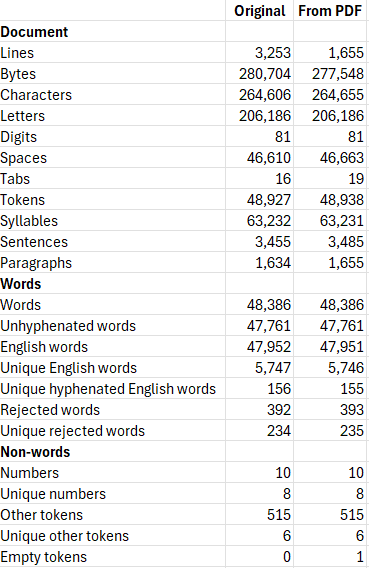
This yielded the plain text file used for obtaining the results reported in the User Manual. That file was subsequently converted to PDF by sending it to the Microsoft Print to PDF printer from Notepad. The resulting PDF file was then converted back to plain text as described above and analyzed in Word Stats. The table below compares the analysis results of the original file and the file recovered from PDF.
Discussion
Paragraphs in original document get broken into multiple lines in the PDF file. Opening the latter in (e.g.,) Adobe Acrobat, selecting and copying the first two paragraphs and pasting them in a plain text editor gives:
In my younger and more vulnerable years my father gave me some advice that I’ve been
turning over in my mind ever since.
“Whenever you feel like criticizing anyone,” he told me, “just remember that all the
people in this world haven’t had the advantages that you’ve had.”
Here we can notice two things:
- Both paragraphs, each a single line in the original text file, are broken into two lines.
- The empty line that separated the paragraphs in the original file is gone.
The first point means that if the full text were converted from PDF to text this way, the number of lines would become much higher than in the original. Since Word Stats expects each paragraph to be on its own line, the number of paragraphs would be much higher as well. The second point means that empty lines cannot be used to recover paragraph boundaries, and also reduces the number of lines.
Fortunately, Word's PDF to text conversion recovers paragraphs, meaning that each fragmented paragraph gets re-combined into a single line. Any empty lines between paragraphs are not recovered though.
We can observe that i) most elements in the comparison above are quite close and ii) the number of lines is quite different. The latter stems from the removal of empty lines. The number of bytes would also be closer if empty lines were preserved, since each empty lines consists of two characters (a carriage return <CR> and a line feed <LF>). An explanation of all small differences would require a deeper analysis which we have not performed.
Conclusion
Even high-quality conversion of a plain text document that has very little formatting, no page numbers, no headers or footers, no table of contents, no footnotes and no hyperlinks, to PDF and back to plain text introduces changes compared to the original document. This reminds me of a dual adage that I learned long time ago, at an internship I did as part of my MS degree: measuring is knowing, but know what you measure. In the current context, measuring refers to using Word Stats to analyze a plain text document, while knowing what you measure means making sure that the document to be analyzed is as close to what you want it to be as possible. Reviewing a document obtained by PDF conversion and cleaning it up as needed prior to analysis is therefore highly recommended.